SmartTruckRoute 2 Nav & IFTA
SmartRoutingMaps & Navigation
4.11.83K Reviews
- Version
- 4.2.20260727_932
- Installs
- 100.00K
- Age Rating
- Everyone
Screenshots
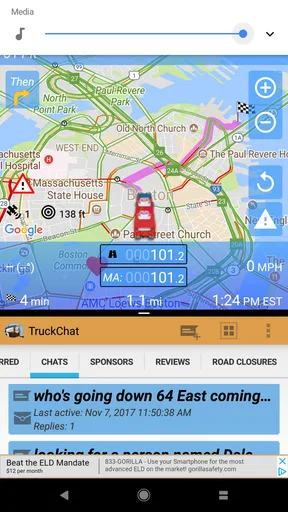
Our Review of SmartTruckRoute 2 Nav & IFTA
 Analysis by Appyee
When a truck route looks convenient on an ordinary map, the bridge clearance or a road restriction can turn that shortcut into a serious problem. That is the specific job I would want SmartTruckRoute 2 Nav & IFTA to do well: make navigation more relevant to a truck than a car. From SmartRouting, this free Maps & Navigation app is built around truck routing, live traffic and IFTA tools. Its central promise is practical rather than flashy—help a driver choose a suitable way through, instead of simply drawing the quickest-looking line.
Why truck-specific routing changes the decision
For a car driver, a route is often a balance between time and distance. For a trucker, a road can be unusable because of a low bridge or another restriction, even when it looks like the obvious way forward. That makes truck-aware routing more than a convenience: it can help prevent a wrong turn from becoming a difficult detour. I would treat this as the app’s defining strength, while still checking that a suggested route makes sense for the vehicle and the trip.
Traffic information adds another layer. A route that avoids a clearance problem can still be slowed by congestion, so live traffic can help with the timing decision. I would use the guidance to compare the available options, not assume that the app can anticipate every road change. Conditions can shift after a route is planned, and a driver still needs to pay attention to signs and restrictions on the road.
How I would use it before and during a drive
My most useful workflow would start before pulling out: enter the destination, review the proposed truck route, and look for any part that deserves a second look. That is especially worthwhile when the destination is unfamiliar or the last few miles pass through local streets. A truck-friendly route can reduce uncertainty on the main journey, but the approach to a customer, loading entrance or yard may still require care and local knowledge.
Once moving, I would let navigation support the drive rather than distract from it. Voice-guided directions are described as part of the experience, which is useful when a driver needs to keep attention on the road instead of repeatedly checking a screen. If traffic changes, an alternate suggestion may be worth considering, but I would weigh it against posted signs, current conditions and the vehicle’s needs before following a last-minute change.
IFTA is useful, but records still deserve attention
The IFTA side speaks to a different part of truck work: keeping fuel and mileage information organized across state lines. The original article describes automatic logging, report generation and options to print or save a PDF, with manual entry available when needed. That combination can make routine recordkeeping less scattered. I would still review entries rather than treating any automated log as a substitute for checking business records.
A practical habit is to make a quick check after a trip or fuel stop, while the details are easy to remember. Manual entry is also a useful fallback when a purchase or mileage detail needs correction. Drivers who already have a reliable bookkeeping process may not need to move everything into one app; the value is greatest when keeping route and IFTA information together reduces friction rather than creating another record to reconcile.
Who is likely to get the most from it
I can see this being most useful for independent drivers and small operations that want truck-oriented routing alongside help with IFTA organization. It is also a sensible option for someone who regularly travels unfamiliar roads and wants to think about bridge and restriction issues before reaching them. SmartTruckRoute 2 has a 4.0 average from around 3,000 ratings, with over 100,000 installs, so it has an established audience without that alone proving it will suit every cab or workflow.
It may be less compelling for a driver who only needs basic directions on familiar routes, or for a fleet that already relies on a dedicated dispatch and compliance system. General navigation apps can be convenient for ordinary trips, but their car-focused assumptions make them a weaker fit when truck restrictions are central. Conversely, a driver whose main need is detailed fleet coordination should compare this app with tools designed around that wider operation rather than expecting navigation and IFTA support to cover every business task.
Feature-Packed Navigation
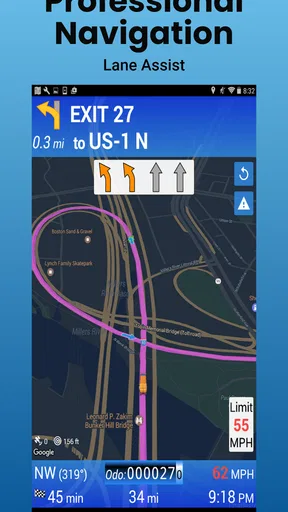
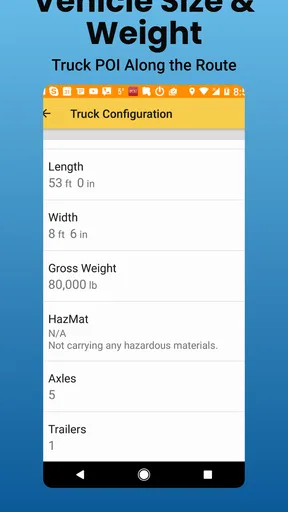
First off, the navigation functionality is top-notch. SmartTruckRoute 2 Nav & IFTA provides real-time updates on traffic and road conditions. This means you can avoid pesky traffic jams and road closures. The app uses a combination of GPS and cell data to give you the most accurate routes possible. And the best part? It tailors these routes specifically for trucks, taking into account height, weight, and hazardous materials restrictions.
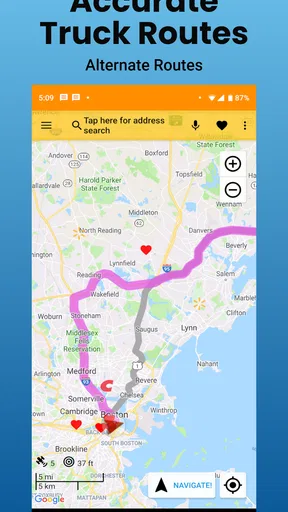
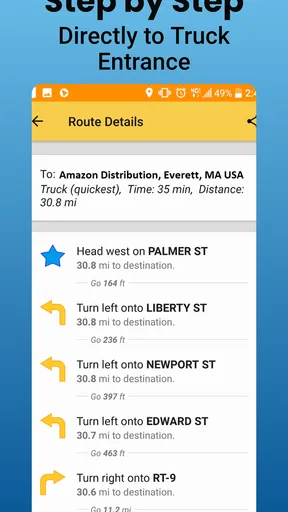
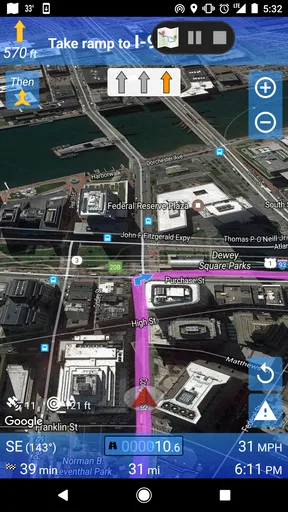
One of my favorite features is the voice-guided navigation. It's like having a co-pilot who never gets tired or needs a bathroom break. The voice commands are clear, concise, and keep you focused on the road ahead. Plus, the app provides alternate route suggestions to keep you moving efficiently.
IFTA Fuel Tax Reporting
Now, let's talk about a feature that will save you a ton of paperwork: IFTA fuel tax reporting. As truckers, we know how much of a pain it can be to keep track of fuel purchases across state lines. This app simplifies the process by automatically logging your fuel purchases and miles driven in each state. At the end of the quarter, generating a report is as easy as pie. You can either print it out or save it as a PDF.
The app also allows you to manually enter data if needed, giving you full control over your records. And if you're someone who likes to stay organized, you can even categorize your trips and expenses for easy reference later.
User-Friendly Interface
One thing I really appreciate is how user-friendly the app is. The layout is intuitive, so you’re not fumbling around trying to figure out how to input your information or change your settings. Everything is where you’d expect it to be. The map is easy to read, and the options for zooming in and out are smooth and responsive.
Plus, the app supports multiple languages, which is a huge bonus for those of us who might be driving internationally or have a multicultural team. It’s accessible and straightforward, ensuring that you spend less time fiddling with your phone and more time keeping your eyes on the road.
Additional Features Worth Mentioning
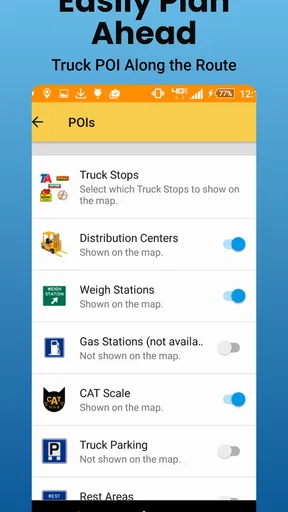
Aside from navigation and IFTA reporting, the app also offers a range of other features that are incredibly useful. It includes weather updates, so you can plan for any storms or severe weather conditions. There’s also a point-of-interest feature that highlights truck stops, rest areas, and weigh stations along your route. It’s like having a personal assistant who knows exactly what a trucker needs.
If you’re someone who likes to plan, you’ll love the trip cost estimator. It calculates tolls and fuel costs for you, helping you budget your trip more effectively. And for those who are environmentally conscious, the app also provides eco-routing options to help you reduce your carbon footprint.
Making it part of a real workday
Imagine leaving for an unfamiliar delivery with a tall truck and a tight arrival window. I would plan the route before departure, then use the live traffic view as a prompt to reassess if congestion develops. If an alternate route appears, I would not accept it automatically: I would check whether it still suits the vehicle and destination, because a faster detour is only useful if it remains appropriate for a truck.
At a fuel stop, I would also use the pause to check that the trip and fuel details are being captured as expected. That small routine is more dependable than waiting until the end of a reporting period to discover a missing entry. The combination of route guidance and recordkeeping is most helpful when it supports habits like these; it is not a replacement for attentive driving or careful bookkeeping.
Where I would be cautious
Truck routing can reduce the risk of choosing an unsuitable road, but no navigation app should overrule a posted restriction or a driver’s judgment. I would keep an eye on signs, especially near construction, temporary closures and the final approach to a delivery point. Likewise, live traffic is useful for reacting to changing conditions, but it does not guarantee that every suggested detour will be the best choice for a particular rig.
There is also a practical trade-off in putting navigation and tax records in one place: convenience comes with the need to keep the information accurate. If a driver prefers a separate, established system for mileage and receipts, switching routines may not be worth it. The app is free to install, but it includes in-app purchases ranging from $15.99 to $199.99 per item, so I would check what is included at the point of use and decide whether any paid option matches a real need before committing.
It is rated for Everyone and runs on Android 6.0 or later. The current version is 4.2.20260218_898, and the app was released on December 1, 2016. Those details make it easier to judge basic compatibility, but the more important question is whether truck-specific routing and IFTA support fit your day-to-day work. If you mainly drive a car, need only occasional directions, or already have a fleet platform that handles these tasks well, a simpler or more specialized alternative may be the better fit.
Final Thoughts
In conclusion, SmartTruckRoute 2 Nav & IFTA is more than just a navigation app; it's a comprehensive tool that makes life on the road easier and more efficient. Whether you’re a seasoned trucker or new to the industry, this app is designed to meet the unique challenges faced by truck drivers. The combination of real-time navigation, IFTA reporting, and user-friendly features makes it a worthwhile investment.
If you’re ready to hit the road with a reliable co-pilot, you can download the app on both Android and iOS. Give it a try, and I bet you’ll wonder how you ever managed without it. Safe travels!
Verdict
Strengths of SmartTruckRoute 2 Nav & IFTA
- Real-time traffic updates enhance route efficiency.
- Customizable routes tailored for truck dimensions.
- Includes weigh station and rest area locations.
- IFTA fuel tax reporting is simplified and accurate.
- Supports voice-guided turn-by-turn directions.
Limitations of SmartTruckRoute 2 Nav & IFTA
- Requires a subscription for full feature access.
- Occasional GPS signal loss in remote areas.
- Interface may seem cluttered for new users.
- Limited offline map functionality.
- Higher battery consumption during use.
Other Releases by SmartRouting
View All
SmartTruckRoute Truck GPS Navi
Maps & Navigation4.1

SmartRVRoute 2 RV Navigation
Travel & Local3.5
Similar Picks in This Category
View All
Uber - Request a ride
Uber Technologies, Inc.4.7


inDrive. Rides with fair fares
® SUOL INNOVATIONS LTD4.8

Yandex Go: Taxi Food Delivery
Mikromobilnost LLC Belgrade4.8

Bolt: Request a Ride
Bolt Technology4.8

Rapido: Bike-Taxi, Auto & Cabs
Rapido Bike Taxi4.8
Frequently Asked Questions
What is SmartTruckRoute 2 and how does it benefit truck drivers?
SmartTruckRoute 2 is a navigation app specifically designed for truck drivers. It offers real-time routing based on truck-friendly roads, helping drivers avoid low bridges, weight restrictions, and other hazards. The app provides turn-by-turn directions, fuel cost calculations, and integrates with IFTA reporting, making it a valuable tool for efficient and safe trucking.
How accurate is the real-time traffic and weather information in SmartTruckRoute 2?
SmartTruckRoute 2 provides up-to-date traffic and weather information sourced from reliable data providers. The app continuously updates routes based on current road conditions, helping drivers avoid delays due to traffic jams or adverse weather. While highly accurate, it's always recommended to stay informed through multiple sources, especially in rapidly changing conditions.
Is SmartTruckRoute 2 suitable for all types of trucks and trailers?
Yes, SmartTruckRoute 2 is designed to accommodate various types of trucks and trailers. Users can input their vehicle’s dimensions, weight, and other specifications to receive customized routing that avoids roads unsuitable for their specific setup. This ensures compliance with legal restrictions and enhances the safety of the route.
What are the subscription costs for SmartTruckRoute 2, and are there any free features?
SmartTruckRoute 2 offers several subscription plans to suit different needs, including monthly and annual options. While the app itself is free to download, full access to features like real-time routing and IFTA integration requires a subscription. Basic features may be available for free, but to maximize benefits, a subscription is recommended.
How does SmartTruckRoute 2 assist with IFTA reporting?
SmartTruckRoute 2 simplifies IFTA reporting by automatically tracking mileage and fuel consumption across state lines. The app generates detailed reports that comply with IFTA requirements, saving drivers time and reducing the risk of errors. This feature is particularly beneficial for fleet operators who need to ensure accurate and efficient tax reporting.
